Every December, the same problem comes back.
You decorate the house. You plug in the Christmas lights. Then you realize lighting control means plugging and unplugging multiple strands of lights every night. All the different Christmas lights scattered across different outlets — the tree in one place, window lights in another, decorations somewhere else entirely.
Wouldn’t it be nice if turning on one set of lights could automatically turn on the rest?
The good news: you can synchronize Christmas lights so they all turn on together — even if they’re plugged into different outlets, and even if you don’t have a switch-controlled outlet — without using smart plugs, cellphone apps, or WiFi. This works whether you use a wall switch, a normal always-on outlet, or simply plug in one set of lights to trigger the rest.
Why Christmas Lights Are So Annoying to Control
Most holiday lighting setups run into the same issues:
-
The outlet isn’t near a wall switch
-
Only one outlet is switch-controlled
-
Decorations are spread all across the room
-
Smart plugs require apps and WiFi
-
Timers don’t match your schedule
Holiday lighting should feel festive — not frustrating.
Why Smart Plugs Aren’t Always the Best Holiday Solution
Smart plugs are often suggested for Christmas lights, but they come with drawbacks:
For something as simple as turning on Christmas lights, that’s a lot of complexity.
The Simple Way: Let the Wall Switch Do the Work
Instead of making your lights “smart,” you can make your switch-controlled outlet smarter.
The idea is simple:
-
Use the switch-controlled outlet as a trigger
-
Place your Christmas lights wherever you want
-
Turn everything on and off with one physical wall switch
This works especially well for:
-
Christmas trees
-
Window lights
-
Mantle decorations
-
Tabletop holiday decor
-
Indoor light displays
Flip the switch when you enter the room — the lights come on.
Flip it off when you leave — all of your Christmas lights shut down.
No apps.
No WiFi.
No confusion.
You Don’t Even Need a Switch-Controlled Outlet
Here’s something that adds even more options to your lighting control:
You don’t need a switch-controlled outlet to synchronize Christmas lights.
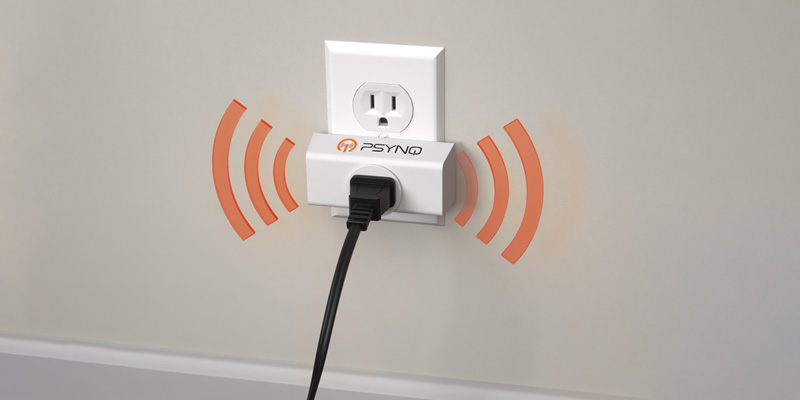
If you plug a string of Christmas lights into a PSYNQ transmitter that’s plugged into a normal, always-on outlet, PSYNQ can sense when those lights turn on.
When it detects that electrical load, it sends a signal to one or more PSYNQ receivers—which instantly turn on the lights or decorations plugged into them.
That means:
-
Plugging in or turning on one set of Christmas lights can automatically turn on others
-
Decorations in different parts of the room can light up together
-
Everything feels coordinated, even without a wall switch
In practice, it feels simple:
You plug in the Christmas tree lights.
The window lights come on.
The mantle decorations light up.
All at once.
No apps.
No WiFi.
No smart plugs.
No setup every year.
Why This Works So Well for Holiday Decorating
Christmas decorations are rarely plugged into the “right” outlet.
They’re wherever the tree fits best.
On whichever window looks nicest.
Where the decorations feel balanced.
PSYNQ lets your lighting follow your decorating choices instead of your home wiring.
Once the holidays are over, the same setup can be used for lamps and everyday lighting—nothing gets packed away or wasted.
One Switch, Multiple Decorations
If you’ve ever wished you could turn on:
-
The Christmas tree
-
Window lights
-
A decorative lamp
-
Accent lighting
…all at once — this approach makes that possible.
It also means:
-
Kids can’t accidentally break the setup
-
Babysitters and houseguests don’t need special instructions
-
Everything works even if the internet is down
Holiday Lighting That Doesn’t Get Packed Away Forever
One of the best parts of using a PSYNQ-based solution is that it doesn’t stop being useful in January.
After the decorations come down, PSYNQ can be used for:
-
Lamps
-
Ambient lighting
-
Seasonal decor
-
Everyday room lighting
You’re not buying a product that only gets used a couple months a year.
Make Holiday Lighting Feel Effortless
Christmas lights should add warmth and joy — not extra steps to your day.
If you want your holiday lights to all turn on and off at the same time — without smart plugs, apps, or WiFi — PSYNQ was built for exactly that.
Reserve PSYNQ for $1 and lock in the VIP $40 price (retail ~$60) — and make controlling your holiday lights a breeze.: presale.psynq.com








Recent Comments