
Why Smart Bulbs Stop Working When Someone Uses the Wall Switch
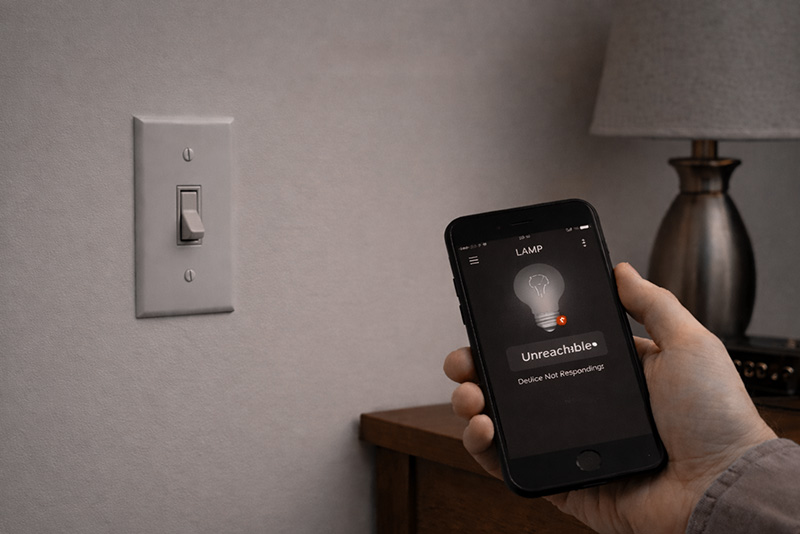
Smart bulbs promise convenience.
You set them up.
You connect the app.
You create schedules and scenes.
And then someone flips the wall switch — and everything breaks.
If this has happened in your home, you’re not doing anything wrong. It’s a fundamental conflict between how smart bulbs work and how people actually use wall switches and lamps.
Smart Bulbs Need Constant Power
Smart bulbs rely on the electronic circuitry inside the bulb itself.
For those electronics to work, the bulb needs:
-
Continuous power at the outlet
-
An active connection to your WiFi network
-
A light bulb socket that is powered all the time
When someone flips the wall switch off, the bulb loses power entirely.
That means:
-
The app can’t find it
- The WiFi connection breaks
-
Automations stop
-
Voice control fails
-
Schedules don’t run
The bulb isn’t just “off.”
It’s completely disconnected.
And it’s not just wall switches that can cause problems.
Smart bulbs can also stop working if someone turns the lamp’s own switch off.
Many lamps have rotary knobs or inline switches, and flipping those cuts power to the bulb just as completely as a wall switch does. Once that happens, the smart bulb goes offline, disappears from the app, and stops responding to schedules or voice commands.
From the user’s perspective, it feels random — but it’s the same underlying issue: smart bulbs can’t function without uninterrupted power.
Why This Is Especially Frustrating in Apartments
In apartments and single family homes:
-
Wall switches are still the primary way people expect lights to work
-
Guests, kids, and babysitters use switches instinctively
-
Switch-controlled outlets are common
Smart bulbs quietly assume:
-
Everyone knows not to touch the switch
-
Lighting is app-first
-
Physical controls are secondary
That assumption doesn’t match real life.
The Guest Problem Nobody Talks About
One of the biggest issues with smart bulbs has nothing to do with technology.
It’s usability.
If someone has to be told:
“Don’t use the wall switch — use the app instead”
…the system is already fragile.
Guests don’t want instructions.
Babysitters don’t want to use apps.
Family members don’t remember rules.
And on top of all that, you don’t want the security risks of everyone having access to your system.
Lighting should work the same way for everyone.
Why Smart Bulbs Feel Unreliable (Even When They Aren’t Broken)
From the user’s perspective, smart bulbs feel unreliable because:
-
Sometimes they respond
-
Sometimes they don’t respond
-
Sometimes the app works
-
Sometimes it says the device is offline
In reality, the bulb is behaving exactly as designed — it just wasn’t designed for normal wall-switch or lamp switch use.
That mismatch creates constant friction.
Why This Leads to Abandoned Smart Lighting
This is why so many people eventually:
-
Stop using the app
-
Disable smart features
-
Replace the bulbs altogether
The technology works — but the experience doesn’t.
Especially in shared homes and rentals, reliability beats novelty.
A Better Approach Starts With the Switch
Instead of fighting wall switches, a better lighting setup works with them.
That means:
-
Physical switch controls still matter
-
One action can be configured to affect multiple lights
-
Lighting controls should work even if the internet is down
-
Anyone should be able to use it
For many people, the simplest systems end up being the most dependable.
Smart Doesn’t Always Mean Better
Smart bulbs are impressive pieces of technology — but they aren’t always the right tool for the job.
If turning on a light requires:
-
Explaining how it works
-
Avoiding physical switches
-
Troubleshooting connectivity
- Increasing home WiFi security risks
…it may be solving the wrong problem.
If you want lighting that works with wall switches instead of fighting them—without apps or WiFi—you can reserve PSYNQ for $1 and lock in the VIP $40 price (retail ~$60): presale.psynq.com
Recent Comments